Advanced test reactor

|
Use UI5 to test your ODATA service
Presented by Arnaud Buchholz


|
Agenda
Presented  projects
-
OpenUI5
An enterprise-grade, responsive & open source UI framework -
training-ui5con18-opa
A todo list developed with OpenUI5 to illustrate the testing concepts -
jsdom
A JavaScript implementation of the WHATWG DOM and HTML standards, for use with Node.js -
node-ui5
A Node.js wrapper for OpenUI5, enabling ODATA testing
About the presentation
- There is more than UI in UI5
- In particular, it offers tools to validate the UI
- This presentation is about leveraging UI5 to also test ODATA services
- UI5 tooling is the recommended solution for UI5 development
UI5Con'18
A journey with OPA at UI5Con'18
recording training-ui5con18-opaWhat is One Page Acceptance?
OPA is a set of tools used to automate and validate UI and it comes with backend mocking.
Tests are organized in Journeys, based on Pages to provide a readable abstraction of the UI.
The need for a backend
When the application has a backend counterpart, it can't run without being connected to it.
However, tests have to rely on a stable dataset and some features might be dangerous.
Introducing the MockServer
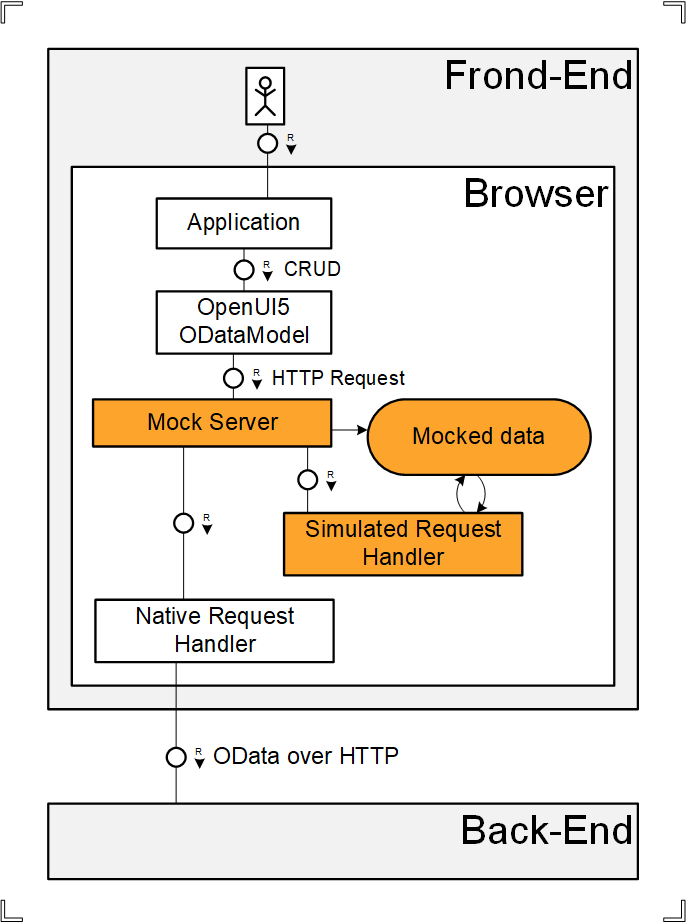
The MockServer is a software component that captures AJAX requests and either answer them or let them reach the backend.
It handles its own set of mocked data.
DEMO Automated tests samples
Application OPA testsMockServer as a real server
The request
After UI5Con'18,
a colleague submitted a strange request.
His team needed a fake ODATA server to validate an unusual network configuration.
His prototype
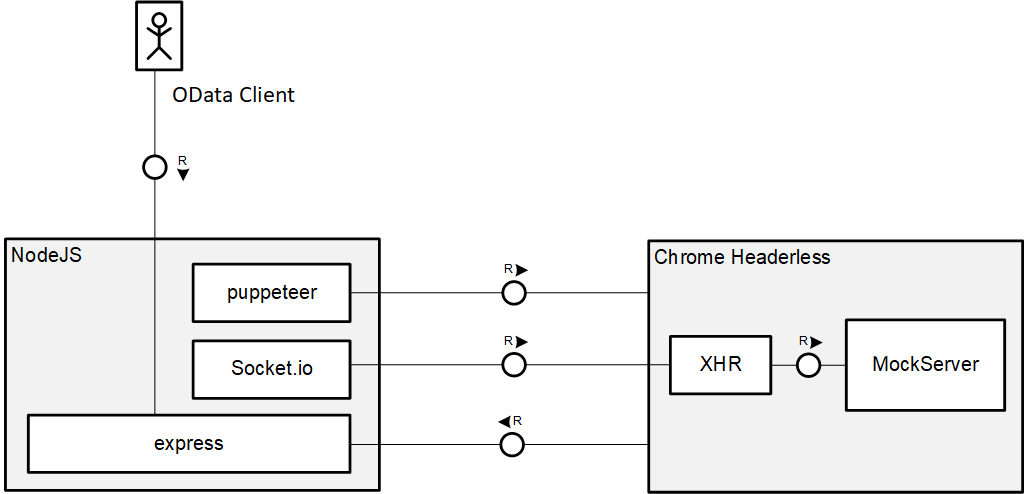
There must be a better way!
Why not running MockServer inside Node.js ?
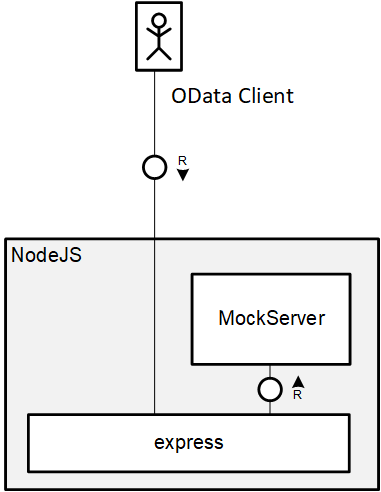
Introducing jsdom
jsdom simulates a browser inside Node.js.
const dom = new JSDOM(`<script id="sap-ui-bootstrap"
  src="resources/sap-ui-core.js"
  data-sap-ui-compatVersion="edge"
  data-sap-ui-frameOptions='allow'
  data-sap-ui-preload='async'>
</script>`, {
  url: "https://example.org/",
  referrer: "https://example.com/",
  contentType: "text/html",
  includeNodeLocations: true,
  storageQuota: 10000000
});jsdom Challenges
- Huge framework and slow to start
- No synchronous requests
- CORS limits access to servers
- Environments are isolated
(not able to run Node.js code in loaded scripts)
Rewriting XMLHttpRequest
- Enables loading of file system resources
- Remote resources are handled natively
- Synchronous code is handled with DeAsync.js
DEMO MockServer server
$metadata ApplicationUI5 inside Node.js
The MockServer proof of concept demonstrated that it is possible to run UI5 in Node.js.
What else can be done?
Anything!
Introducing node-ui5 *
https://www.npmjs.com/package/node-ui5node-ui5 wraps UI5 API in Node.js.
require('node-ui5').then(({sap}) => {
  sap.ui.require([
    /* module dependencies */
  ], function (/* module values */) {
	  /* ... */
  })
})Benefits of running in Node.js
Native support of latest JavaScript features:
- template literals
- arrow functions for callbacks
- async functions,
await operator
(node-ui5 provides asynchronous wrappers)
Easy to automate.
DEMO Accessing MockServer server
demos/test.jsrequire('node-ui5')
.then(({ sap }) => {
sap.ui.require([
'sap/ui/model/odata/v2/ODataModel',
'node-ui5/promisify'
], async function (ODataModel) {
console.log('Creating ODataModel...')
const model = new ODataModel({
serviceUrl: 'http://localhost:8080/odata/TODO_SRV'
})
console.log('Reading $metadata')
await model.metadataLoaded()
console.log('Reading TODO items')
const { results } = await model.readAsync('/TodoItemSet')
console.log(`Found ${results.length} todo items`)
/* ... */OData testing with UI5
OData testing
UI developers are the primary users of the ODATA service but they are not involved in ODATA testing.
Furthermore, testing usually focuses on CRUD methods and rarely on checking $metadata.
DEMO ODATA testing with Postman
demos/postman_collection.jsonODATA in UI5 applications
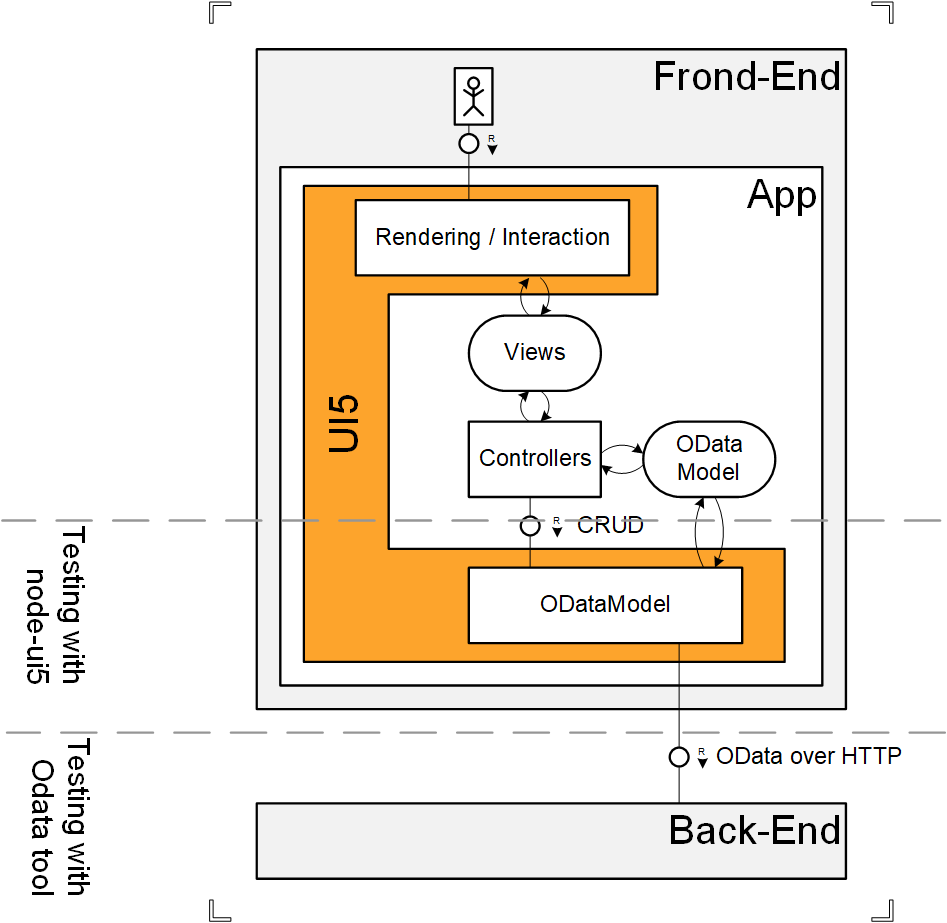
ODATA calls are made through the ODataModel class.
ODataModel benefits
- Validates $metadata
- Provides description of entities
- Encapsulates CRUD
- Deserializes entities
- Enables batching of requests
DEMO ODATA testing with UI5
demos/odata-test.jsConsidering the effort
When building an application, a good practice is to also prepare the MockServer for OPA testing.
The MockServer can be implemented the TDD way.
To some extend, the same tests may apply to a real server.
DEMO ODATA testing with UI5 and qUnit
MockServer testsqUnit tests of MockServer demos/qunit-mockserver.js
OPA end-to-end (Proof Of Concept)
Integration Testing
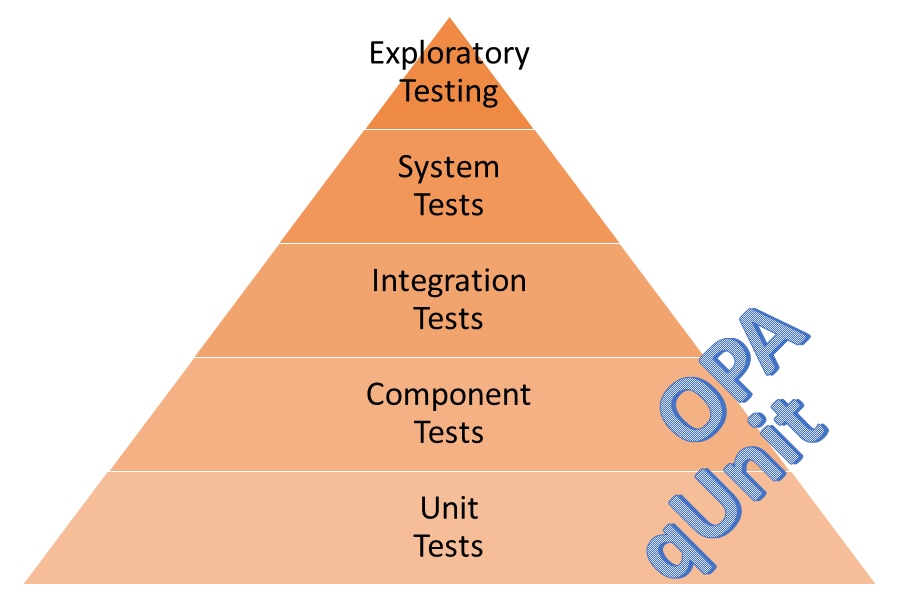
OPA is used for integration testing but with no connection to the server.
That's why the MockServer is part of the framework.end-to-end testing challenges
Thanks to OPA concepts, the developer can automate the application.
But the application must be hosted on the server to access the ODATA service. However, the test code is not delivered.
It is not possible to run OPA tests against a distant server.
node-ui5 proxy server
node-ui5 offers a configurable proxy server that flattens the system landscape.
The OPA code can access the distant server as if it was local.
DEMO OPA end-to-end testing
OPA on OpenUI5 documentationKey Take-Aways
- There is more than UI in UI5
- node-ui5 enables the use of UI5 in Node.js
- UI developers can help with backend testing
- Experimenting is fun and leads to new ideas
Workshop
Building a MockServer
Want to open the slides locally ?go to https://bit.ly/2FsObxZ
Prerequesites (Node.js)
WebIDE setup on next slide- Install LTS version of Node.js
- Clone / download training-ui5con18-opa
https://github.com/ArnaudBuchholz/training-ui5con18-opa.git - Run
npm iin the cloned / unzipped folder - At the beginning of the workshop,
runnpm run-script ui5con19
Prerequesites (WebIDE)
- Clone repository training-ui5con18-opa
https://github.com/ArnaudBuchholz/training-ui5con18-opa.git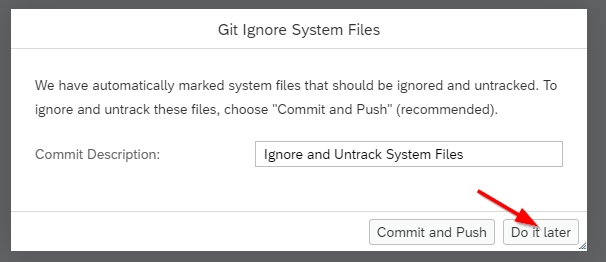
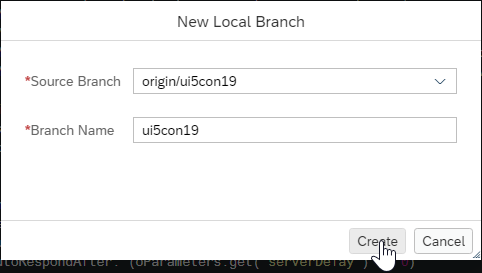
- Create / Switch to
ui5con19branch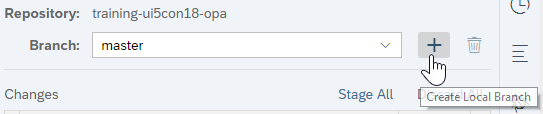
The TDD way
The goal of this workshop is to pass all the tests.
webapp/test/unit/test/MockServer.jsSee the tests results:
- For Node.js, open
http://localhost:8080/test/unit/unitTests.qunit.html?module=MockServer - For WebIDE, select Run as a Web Application on
/training-ui5con18-opa/webapp/test/unit/unitTests.qunit.html
Initial MockServer
To achieve this goal, the initial MockServer implementation must be customized.
webapp/test/MockServer.jsSee the default behavior:
- For Node.js, open
http://localhost:8080/index.html - For WebIDE, select Run as a Web Application on
/training-ui5con18-opa/webapp/index.html
Test 1 : Exposes predefined items
MockServer is capable of preloading
entities from a JSON file.
- Files location is given by sMockdataBaseUrl
- File name must match the entity set (case sensitive)
- It must contain an array of objects
- Only define the necessary fields
- Date/Time fields use a specific format
"/Date(" + date.getTime() + ")/"/training-ui5con18-opa/workshop/ui5con19-mockserver/step1/webapp/model/TodoItemSet.json
Test 2 : Exposes more than 100 items
Using getEntitySetData and setEntitySetData, one can manipulate the MockServer's entities.
- Returned array contains a copy of MockServer's entities
- All fields must be set, including
__metadata
oItem.__metadata = {
  uri: "/odata/TODO_SRV/TodoItemSet(guid'" + sGuid + "')",
  type: "TODO_SRV.TodoItem"
};
Test 2 : Exposes more than 100 items
Allocate new entities in a loop with ./newItem
sap.ui.define([
	"sap/ui/core/util/MockServer",
	"sap/ui/demo/todo/const",
	"./newItem"

], function(MockServer, CONST, getNewItem) {
	/* ... */
	var todoItemSet = CONST.OData.entityNames.todoItemSet;
	var aTodoItemSet = _oMockServer.getEntitySetData(todoItemSet),
	aTodoItemSet.push(getNewItem("title",
		/* due date */ new Date(),
		/* completion date, optional */ new Date()
	));
_oMockServer.setEntitySetData(todoItemSet, aTodoItemSet);/training-ui5con18-opa/workshop/ui5con19-mockserver/step2/webapp/test/MockServer.js
Test 3 : Handles update of item
MockServer offers default CRUD implementations.
Using getRequests
and setRequests,
it is possible to alter their behavior.
Request definition
{
  method: "MERGE",
  path: CONST.OData.entityNames.todoItemSet + "\\(guid'([^']+)'\\)",
  response: function(oXhr, sCapturingGroupValue) {
    // oXhr.respond(iStatusCode, mHeaders, sBody);
    return true || false;
  }
}methodis the HTTP verb to matchpathis a regular expression matching the request URL (string or RegExp)- capturing groups' values are passed to the
responsefunction
- capturing groups' values are passed to the
oXhrsimulates an XMLHttpRequest object- Use
oxhr.respondto answer the request
- Use
- If the
responsefunction returns true, the MockServer won't search for another matching definition (LIFO)
Test 3 : Handles update of item
- Update is done with PUT or MERGE on a given entity,
check the unit test that reflects the application behavior - Use regex101 to check your expression
remember to double escape \ when using strings - For this test case, we want the backend to assign / remove the completion date
- The default handler will take care of updating the entity based on the request body
Test 3 : Handles update of item
var aRequests = _oMockServer.getRequests();
aRequests.push({
	method: "?",
	path: CONST.OData.entityNames.todoItemSet + "\\(guid'([^']+)'\\)",
	response: function(oXhr, sTodoItemGuid) {
		var oBody = JSON.parse(oXhr.requestBody);
		if (oBody[CONST.OData.entityProperties.todoItem.completed]) {
		} else {
		}
		oXhr.requestBody = JSON.stringify(oBody);
		return false; // Keep default processing
	}
});
_oMockServer.setRequests(aRequests);/training-ui5con18-opa/workshop/ui5con19-mockserver/step3/webapp/test/MockServer.js
Test 4 : Handles creation of a new item
- Create is done with a POST on the entity set
- For this test case, a new item must NOT be completed
Solution in
/training-ui5con18-opa/workshop/ui5con19-mockserver/step4/webapp/test/MockServer.js
Test 5 : Simulates an error
It is important to check how an application
behaves in case of errors.
if (sTodoItemGuid === STOP_PROCRASTINATING_GUID) {
	oXhr.respond(400, {
		"Content-Type": "text/plain;charset=utf-8"
	}, "I'll start tomorrow !");
	return true; // Skip default processing
}/training-ui5con18-opa/workshop/ui5con19-mockserver/step5/webapp/test/MockServer.js
Test 6 : Implements ClearCompleted function import
- Unlike CRUD operations on entities,
the MockServer can't default function imports.
Any use before implementation will go to the backend - A result is expected, check $metadata
oXhr.respond(200, {
	"Content-Type": "application/json;charset=utf-8"
}, JSON.stringify({
	d: oResult
}));/training-ui5con18-opa/workshop/ui5con19-mockserver/step6/webapp/test/MockServer.js